Made for MacNative SwiftUI app
CuePatch for macOS
Subtitle files,
back in sync.
Convert, retime and validate whole subtitle folders with a focused Mac app that keeps every original intact.
Made for Mac macOS 14+ Apple notarized
Apple notarizationCompleted
One-time purchase$19 · No subscription
Batch-readySRT, VTT, ASS and SSA
Safe exportsOriginal files stay intact
Built for the annoying last mile between “almost right” and ready to publish.
Actual Release build · macOS
This is CuePatch.
Not a render.
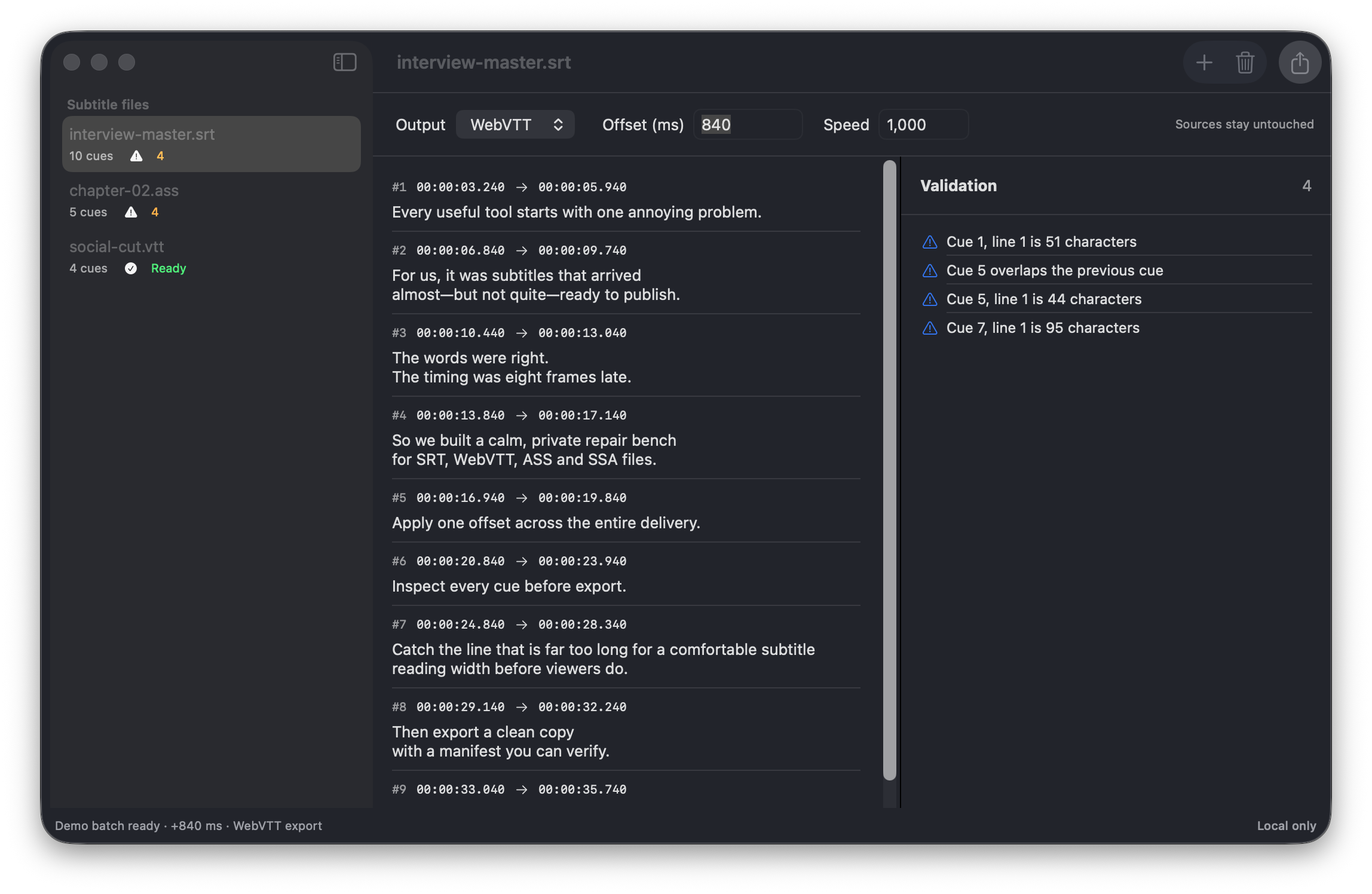
Three real subtitle files are loaded below. The app is applying a +840 ms offset, preparing WebVTT output and surfacing every overlap or long line before export.
CuePatch 0.1.0 running locallyREAL APP CAPTURE
Ways to use it
One repair bench.
Four common handoffs.
Late subtitle export
Move every cue forward or back when the final video cut shifts.
Localization delivery
Review a folder of mixed subtitle formats before it reaches a client.
YouTube and podcasts
Convert caption files and catch crowded lines before publishing.
Archive migration
Turn ASS or SSA dialogue into clean SRT or WebVTT with explicit warnings.
THE RESULT
interview-master-patched.vttcuepatch-manifest.jsonOriginals untouchedA calm three-step repair
Drop it. Check it.
Ship the clean copy.
Import a file or folder
Bring in SRT, VTT, ASS or SSA files. CuePatch reads declared timings and keeps the sources untouched.
Correct timing with context
Apply an offset or speed adjustment, then inspect every resulting cue before committing.
Export with a paper trail
Write clean SRT or WebVTT copies plus a manifest with source hashes, settings and issue counts.
Focused by design
Everything needed to repair subtitles. Nothing that gets in the way.
Batch retiming
Apply one timing recipe across a complete delivery folder without touching the original files.
Format conversion
Move between SRT and WebVTT, or extract clean dialogue from ASS and SSA with explicit style-loss warnings.
Validation before export
Catch overlaps, empty cues, invalid durations, long lines and crowded subtitles before viewers do.
Private by default
No video upload, no account and no server processing. The work stays on this Mac.
Practical guides
Fix the file you have.
Questions, answered
CuePatch FAQ
Can CuePatch sync SRT subtitles on a Mac?+
Yes. CuePatch applies a constant offset or speed correction to SRT files, previews every resulting timestamp and exports a new copy.
Does CuePatch upload my subtitle or video files?+
No. Subtitle parsing, validation and export happen locally on your Mac. CuePatch does not require an account or a cloud upload.
Which subtitle formats does CuePatch support?+
The first release imports SRT, WebVTT, ASS and SSA. It exports clean SRT or WebVTT and warns before styled ASS or SSA content is flattened.
Will CuePatch overwrite the original subtitles?+
No. By default it creates a separate CuePatch Output folder, adds a suffix when names collide and records every export in a JSON manifest.
How much will CuePatch cost?+
The price is US$19 as a one-time purchase for one Mac, with no subscription. Secure checkout and DMG delivery are handled by Polar.
Which payment methods will be available?+
At launch, Polar will process checkout as the merchant of record. Available cards and eligible wallets depend on your country, browser and device, and applicable tax is calculated at checkout.
CuePatch for macOS
Subtitle repair,
without a subscription.
Convert, retime and validate locally. Every export is a new copy with a manifest.
- macOS 14+
- One Mac
- Free launch updates
One-time purchase$19No recurring charge
Signed with Developer ID and notarized by Apple.